
Battleship – Play Online for Free
Who invented Battleship? The exact origin of this classic game remains uncertain, but evidence suggests that over 120 years ago players were already battling it out with nothing more than paper and a pencil. What made it so enduring is the concept itself: two opponents, two hidden fleets, and the slow, tense process of narrowing down where the enemy is hiding. The game spread across the world long before it ever appeared in a box, passed from person to person as a game anyone could play anywhere. You can play Battleship online here for free, directly in your browser, with no download required.
Rules of the Game
Traditionally, Battleship is a two-player game. In the classic offline version, each player draws a square grid on graph paper. The horizontal axis is labeled with letters, the vertical axis with numbers, giving each square a precise coordinate.
Players decide which ship types to use and how large they are. A typical setup includes destroyers of three squares, submarines of four squares, and larger vessels beyond that. Both fleets are identical in size and composition. Each player places their ships on the grid either horizontally or vertically; diagonal or angled placement is not allowed. A divider between players is essential to keep each fleet hidden from the opponent.
To sink the enemy fleet, players take turns calling out coordinates. If you call "B9", your opponent checks whether one of their ships occupies that square and replies "miss", "hit", or "sunk", the last of these meaning that every square of that ship has now been hit. It is worth noting all your shots and any hits your own fleet sustains to keep a clear picture of the battle. You win by sinking every enemy ship.
Tips for a Successful Battle
At the start of the game, shots are often fired at random. As the first hits accumulate, the fog of war begins to lift and a few strategic habits can give you a real edge.
- The player who achieves the best result with the fewest shots wins. Firing methodically at every square in order is a sure way to lose. A smarter approach is to keep the size of the smallest ship in mind. In this version it occupies three squares, so leave two squares between shots, both horizontally and vertically. This gradually casts a net across the board that no ship can hide in.
- An enemy ship is likely positioned somewhere near the centre of the board. That is a good reason to direct your first torpedoes towards that area, and equally good reason to avoid placing your own ships there.
- Pay close attention to the hit indicator. Knowing which enemy ships have been damaged or already sunk helps you determine which ones are still lurking somewhere on the board.
- Still struggling? That is not unusual: Battleship involves a considerable element of luck, and your opponent is probably applying the same basic strategies. Most players, however, tend to place their fleet in similar patterns each time. What conclusions might that lead you to?
How Battleship Works
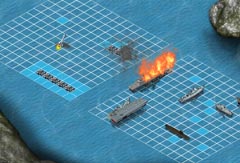
Click Battleship in the More Games menu to reach the start screen, then click the green arrow to choose a mode: CLASSIC or ADVANCED. The battlefield is a 14x14 grid. Your fleet consists of six ships: the smallest occupies three squares, the largest six. The aircraft carrier is the most prominent vessel, made up of two sections of five squares each. Your computer opponent commands an identical fleet.
Clicking the crossed-arrows icon in the top right of the board places all your ships automatically. To arrange them manually, select a ship, drag it onto the grid, and rotate it 90 degrees with the directional arrows if needed. Ships cannot be placed directly adjacent to one another; the green-highlighted squares around each ship indicate the minimum required distance. The trash icon clears the board entirely. You can adjust your fleet layout as many times as you like before pressing the large green Start button to begin.
Once the battle starts you see a blank 14x14 grid. Below it are the enemy ships still afloat and the points you have scored from successful hits. Your own fleet status is visible too, with damaged and sunk ships clearly marked. The mouse cursor becomes a crosshair. Click any square to fire a torpedo and trigger a panoramic view of the battlefield, where the torpedo streaks toward the enemy side and either falls harmlessly into the water or strikes a target. With sound enabled, hits are accompanied by battle effects. Each hit leaves a floating wreck; the final hit sends the ship to the bottom. Destroy the entire enemy fleet to win.
The only difference between CLASSIC and ADVANCED mode appears once combat begins. In Advanced mode, your accumulated impact points unlock two special weapons: a radar that reveals the location of a hidden enemy ship on the grid, and a bomber guaranteed to hit its target. Both cost points that you earn through successful shots.
For more games without any download, you can also try Minesweeper, Sudoku, Spider Solitaire, Freecell, and Backgammon here on this site.